24V LiFePO4 Battery & Charger System
A practical guide for 24V LiFePO4 battery setup, charging, wake-up recovery, troubleshooting, and safety. Built from real battery project notes and source documentation.
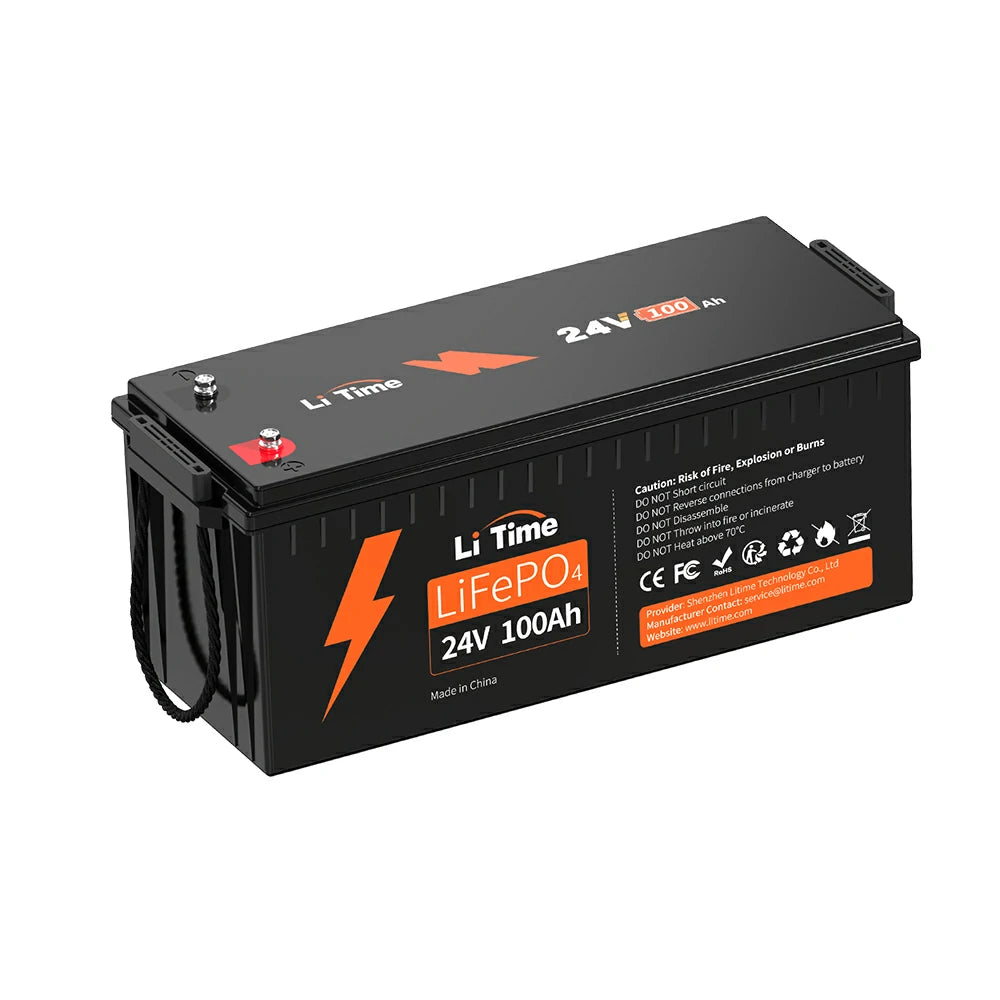
LiTime 24V 100Ah LiFePO4 — primary battery
Dashboard
System overview and key specs at a glance.
System
24V portable backup
Extension-cord / solar-cart style
Battery
LiFePO4 chemistry
8S configuration
Nominal: 25.6V
Charger
29.2V LiFePO4 charger
LiTime 29.2V 20A
BMS
Built-in protection
Over-charge / over-discharge
Temperature / short-circuit
Status badges
24V system LiFePO4 chemistry BMS protected 29.2V charger required No vehicle cranking No panel backfeedingEquipment in this system
| LiTime 24V 100Ah | Smart/Bluetooth LiFePO4 battery (primary) |
|---|---|
| LiTime 29.2V 20A | LiFePO4 charger (primary) |
| Dumfume 24V 100Ah | Recovered battery (probationary) |
| AstroAI 4000-count | Multimeter for diagnostics |
Voltage quick reference
| Reading | Meaning | Action |
|---|---|---|
| ~26V | Normal partial charge | Safe to use or top up |
| ~29.2V (charging) | Charger output / top of charge | Normal during charging |
| 6V - 7V | BMS sleep or serious fault | Do not use. See wake-up procedure. |
| 0V or near 0V | Deep protection or connection issue | Do not improvise. Use proper wake-up charger. |
Voltage alone is not a full health test. It is only one diagnostic clue.
Operation
Normal charging, discharging, monitoring, and load management.
Normal charging workflow
Use the charger compatibility checker in Setup before every charge.
Then plug charger into wall power.
Red = charging. Green = full. Flashing Red = fault. Flashing Green = standby. Monitor the Bluetooth app for real-time SOC and current.
Unplug wall power first, then disconnect from battery. Do not leave charger connected indefinitely.
Normal discharging workflow
Confirm 25V+ before connecting a load. If voltage is low, charge first.
Use appropriate gauge wire, fuses, and connectors. Do not connect bare wires directly to terminals.
Use the Bluetooth app or multimeter. If voltage drops rapidly under load, the battery may be weak or the load too high.
The BMS will disconnect at low voltage. Do not rely on this regularly — it is a safety net, not a normal operating mode.
Bluetooth app monitoring
LiTime Smart batteries support Bluetooth. Use the LiTime app to check: SOC (%), voltage (V), current (A), power (W), temperature, and individual cell voltages.
Using with an inverter
Match inverter input to 24V DC. Check inverter wattage does not exceed battery BMS discharge limit. Add a fuse or breaker between battery and inverter.
Avoiding overload
Calculate total load watts. Compare to battery usable watts (2.56 kWh for 100Ah at 25.6V). Leave margin for inverter losses (typically 10-15%).
Key operating rules
| Do | Use a 29.2V LiFePO4 charger. Keep terminals covered when not in use. Use fuses/breakers in system wiring. Monitor temperature. |
|---|---|
| Don't | Short-circuit terminals. Exceed BMS current limits. Mix 12V and 24V equipment. Charge with wrong charger. Leave damaged battery connected. |
Quick Start / First Setup
Inspect, verify, connect, and observe — in that order.
Check for swelling, dents, cracked casing, leaks, or burn marks. If any damage is found, do not charge.
Set multimeter to DC voltage. Measure directly at the battery terminals. Record the reading. See the voltage reference table on the dashboard.
Verify the charger is labeled for LiFePO4 and outputs 29.2V. Do not use a lead-acid charger or a 12V charger on a 24V battery.
Match the connector physically before plugging in. Red to positive (+), black to negative (-). If polarity is reversed, stop immediately.
Connect charger to battery. Plug charger into wall power only after the battery connection is secure.
Red = charging. Green = full. Flashing Red = fault or protective mode (disconnect and check). Flashing Green = standby. If the charger shows OFF and will not start, see the wake-up procedure.
For LiTime Smart batteries, connect via the LiTime app. Check SOC, voltage, current, temperature, and individual cell voltages if available.
Write down: voltage, app SOC, charge current, and temperature. These are your baseline.
Swelling, smell, heat, sparks, damaged casing, or unstable readings = disconnect and do not continue.
Charger Compatibility Checker
Check each item before charging. If any critical item fails, do not charge.
Troubleshooting Wizard
Pick the symptom. The manual shows the safest next step.
What's happening?
Wake-Up / BMS Recovery Procedure
Use this when the battery reads very low voltage (under 20V) and the charger refuses to start or shows OFF.
Measure directly at the terminals, not at the charger end. Record the exact voltage.
Verify the charger is 29.2V LiFePO4 type. A 12V or lead-acid charger will not work.
The LiTime 29.2V 20A charger can wake a sleeping BMS. It may take up to 1 hour before charging visibly starts.
Watch for: heat, smell, swelling, rapid voltage collapse, sparks, or any abnormal behavior. If any occur, disconnect immediately.
Allow a full charge cycle. Monitor via Bluetooth app if available.
Do not force charge. Do not bypass the BMS. Contact the manufacturer or seller.
Retest under a controlled load before trusting it for real use. A recovered battery may have reduced capacity or hidden cell damage.
Error code table
| Symptom | Likely cause | Resolution |
|---|---|---|
| Charger shows OFF | BMS in sleep/protect mode | Use wake-up procedure above |
| 0V at terminals | BMS disconnected or deep protection | Use proper wake-up charger. Do not improvise. |
| Rapid voltage drop under load | Weak cells or excessive load | Reduce load. Retest. If persistent, battery may be degraded. |
| Bluetooth won't connect | App pairing or BMS communication issue | Re-pair in app. Check BMS is awake. Try after charging. |
| Shows 100% immediately | Surface charge or BMS reporting error | Apply a small load, then recheck. Verify with multimeter. |
Safety
Direct, serious, and non-negotiable.
Cold Weather Charging Warning
Do NOT charge below 32F (0C). Charging a LiFePO4 battery in freezing temperatures will cause permanent damage to the cells. This is a manufacturer-specified limitation, not a suggestion.
If the battery is cold, allow it to warm to above 32F (0C) before connecting the charger. If you need cold-weather operation, consider a LiTime Self-Heating battery model which includes an automatic heating function before charging.
Do NOT
- Use as a starter battery unless the manufacturer explicitly permits it
- Backfeed house wiring
- Connect to a breaker panel casually
- Mix random chargers
- Charge a physically damaged battery
- Leave recovery charging unattended
- Open or disassemble sealed batteries
- Bypass or defeat the BMS
- Connect 12V equipment to a 24V system
Do
- Use eye protection and insulated gloves when working with terminals
- Keep metal tools away from both terminals simultaneously
- Respect polarity — red to +, black to -
- Keep terminals covered when not in use
- Use appropriate fuses or breakers in system wiring
- Keep children, pets, and untrained people away from exposed terminals
- Charge in a dry, ventilated area away from flammable materials
- Stop immediately if you see swelling, smell, heat, or sparks
Short-circuit energy warning
A 24V 100Ah LiFePO4 battery can deliver enough current to melt wire, weld metal tools to terminals, start fires, and cause serious injury. Never place anything conductive across both terminals.
Maintenance
Keep it charged, clean, and checked.
Periodic checks
Storage guidelines
- Store at 50% State of Charge (SOC)
- Recommended environment: 10C-35C (50F-95F), 45%-75% relative humidity
- Cycle (charge/discharge) every 3 months during storage
- Avoid freezing temperatures for charging — do not charge below 32F (0C)
- Avoid direct sunlight and heat sources
- Disconnect all loads during storage
Recovery battery protocol
If a battery has been recovered from low-voltage / BMS sleep (like the Dumfume 24V 100Ah):
- Label it as probationary. Do not use for critical loads without retesting.
- Retest under a controlled load after full charge
- Compare capacity to original spec
- Monitor temperature more closely during use
- Recheck after 30 days of normal use before fully trusting it
Components
Equipment in this 24V LiFePO4 system.
Primary battery: LiTime 24V 100Ah Smart
| Type | LiFePO4 (8S) |
|---|---|
| Nominal voltage | 25.6V |
| Rated capacity | 100Ah |
| Energy | 2560Wh (2.56 kWh) |
| BMS | 100A continuous, built-in Bluetooth |
| Max continuous charge | 100A |
| Max continuous discharge | 100A |
| Burst discharge (5 sec) | 280A |
| Charge voltage | 28.8V +/- 0.4V (charger outputs 29.2V) |
| Recommended charge current | 20A (0.2C) — full charge in ~5 hrs |
| Cycle life | 4000 cycles @ 100% DOD, 6000 @ 80% DOD, 15000 @ 60% DOD |
| Dimensions | L 20.95" x W 8.15" x H 8.5" |
| Weight | ~45.59 lbs (1/3 of lead-acid equivalent) |
| Terminals | M8 bolts |
| Housing | ABS, IP65 rated |
| Charge temperature | 0C to 50C (32F to 122F) |
| Discharge temperature | -20C to 60C (-4F to 140F) |
| Storage temperature | -10C to 50C (14F to 122F) |
| Max expansion | 4P2S (up to 8 batteries, 48V 400Ah) |
| Certifications | FCC, CE, RoHS, UN38.3, ABYC E-13, IEC 62619 |
| Warranty | 5 years |
| Status | Primary In active use |
Source: LiTime official product page and user manual. View on LiTime
Primary charger: LiTime 29.2V 20A
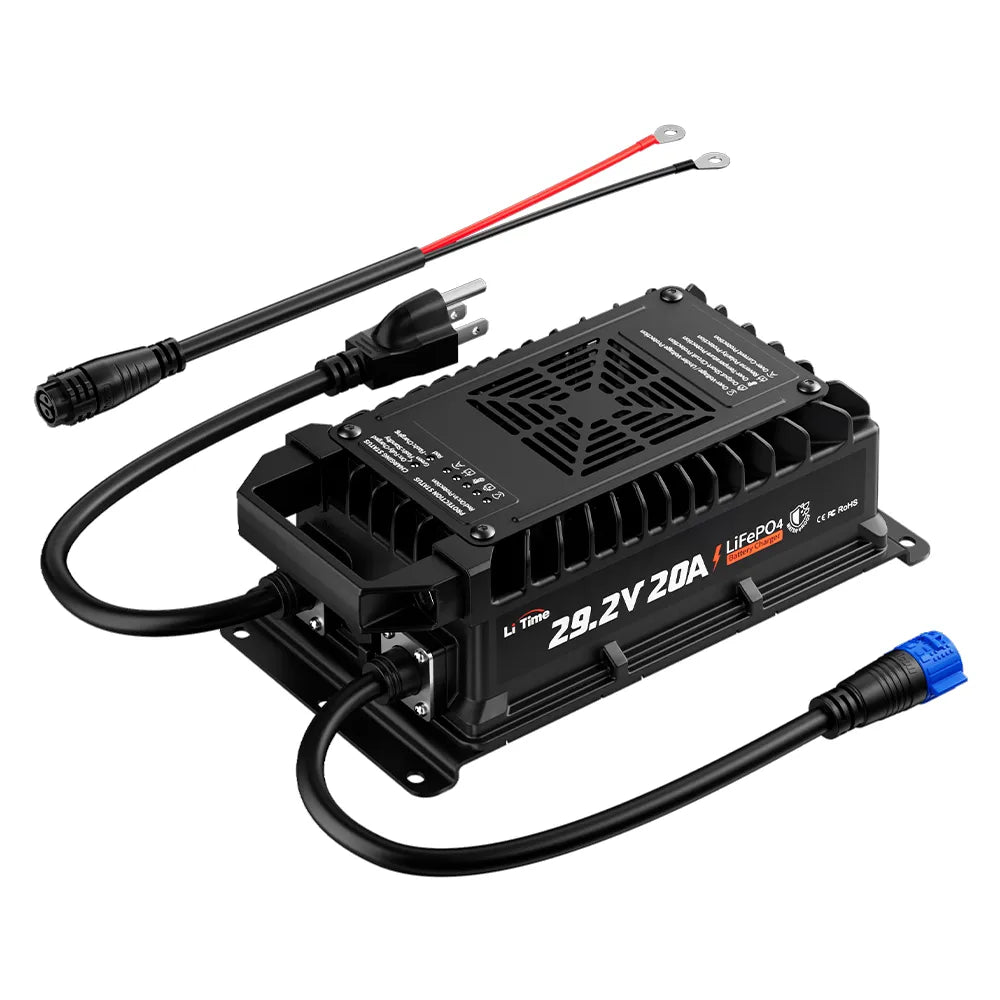
LiTime 29.2V 20A LiFePO4 charger with Anderson connector
| Output voltage | 29.2V |
|---|---|
| Output current | 20A |
| Chemistry | LiFePO4 specific |
| Input voltage | AC 100V-240V, 50-60Hz |
| Max input current | 10A |
| Charge method | CC/CV (constant current / constant voltage) |
| 0V activation | Yes — can wake deeply discharged / BMS-protected batteries |
| LED indicators | Red = charging, Green = full, Flashing Red = fault, Flashing Green = standby |
| Safety protections | Over-temperature, output short-circuit, reverse polarity, output over-voltage |
| Connector | Anderson 50A + M8 terminal |
| Operating temperature | -4F to 104F (-20C to 40C) |
| Storage temperature | -40F to 158F (-40C to 70C) |
| Dimensions | L 10.87" x W 4.75" x H 3.52" |
| Weight | ~5.07 lbs (2.3 kg) |
| Certifications | CE, RoHS |
| Warranty | 2 years |
| Status | Primary Working correctly |
Source: LiTime official product page and user manual. View on LiTime
Recovery case: Dumfume 24V 100Ah
| Type | LiFePO4 (8S) |
|---|---|
| Nominal voltage | 25.6V |
| Capacity | 100Ah (verify — may be degraded) |
| Recovery voltage | ~6.84V (BMS sleep) |
| Recovered to | ~26V after 1 hour on LiTime charger |
| Status | Probationary Retest before trust |
Diagnostic tool: AstroAI 4000-count multimeter
| Function | Voltage, current, resistance, continuity |
|---|---|
| DC voltage range | Up to 600V |
| Count | 4000 counts |
| Use | Terminal voltage verification, charger output check, continuity testing |
| Status | Working |
Calculators
Quick tools for watts, runtime, charge time, and system voltage checks.
Watts calculator
Watts = Volts x Amps
Watt-hours calculator
Watt-hours = Ah x nominal V. For 24V LiFePO4, use 25.6V.
Runtime estimate
Estimates are approximate. Inverter losses, battery condition, temperature, BMS limits, and load behavior affect real runtime.
Charge time estimate
Charge time = Ah needed / charger amps. Add ~20% for charging inefficiency.
12V vs 24V system checker
This manual covers a 24V system. If you enter 12V, you may have a different battery system.
Related Videos
External YouTube resources that complement this manual. Videos remain the property of their respective creators.
3 Ways To JUMP Start And WAKE A DEAD Lithium LiFePO4 Battery FAST!
HOBOTECH — 407K views
Directly relevant: covers our wake-up / BMS recovery procedure with practical demonstrations.
BMS (Battery Management System) Basics for LiFePO4 Batteries
EXPLORIST life — 16K views
Explains how a BMS protects your battery and why it enters sleep mode.
LiFePO4 Charging Guidelines: What is 100%? What is 0%?!
DIY Solar Power with Will Prowse — 495K views
Covers charging voltage, state of charge, and balancing — matches our voltage reference table.
The Rules of LiFePO4: 3 Most Common Causes of Failure
DIY Solar Power with Will Prowse — 1.1M views
Practical safety guidance that reinforces our safety section — what kills LiFePO4 batteries.
These are external resources from YouTube, not produced by BLK19 AI. Provided as supplementary reference only.
Document index and source notes
This interactive manual is built from source documents and real project notes.
Source documents
| Doc | Use | Status |
|---|---|---|
| LiTime 24V 100Ah battery manual | Specs, BMS, Bluetooth, safety | Verified LiTime official product page + PDF manual |
| LiTime 29.2V 20A charger manual | Charger specs, LED codes | Verified LiTime official product page + PDF manual |
| Dumfume 24V 100Ah specs | Recovery case study | Limited Recovery notes only |
| Project notes — battery recovery | Dumfume wake-up procedure | Available |
| AstroAI multimeter manual | Diagnostic tool reference | Available |
What this manual does and doesn't do
Does: Consolidates scattered battery docs, charger specs, troubleshooting steps, safety warnings, and real project lessons into one searchable interactive guide.
Does not: Replace manufacturer instructions, electrical codes, professional electrical advice, or common sense. Does not cover vehicle starting, panel backfeeding, or BMS bypass.
Missing source documents
If a source document is missing or unverified, the manual marks it accordingly. Do not treat unverified specs as confirmed — always check against the manufacturer's documentation.
Public warning
This manual is an AI-assisted reference built from source documents and project notes. It does not replace manufacturer instructions, electrical codes, professional advice, or common sense. Verify all specifications against the manufacturer documentation before use.